Problems专题:Dialog

Problems专题:Dialog

0x01 OnKeyDown部分机型无法监听

问题分析

监听返回键和音量键,重载OnKeyDown()方法,部分机型会失效。

解决方案

给相应的Dialog监听setOnKeyListener()。

1
2
3
4
5
6
7
8
9
10
// 解决不同机型版本兼容问题,onKeyDown 可能被拦截
setOnKeyListener { dialog, keyCode, event ->
Log.d(TAG, "setOnKeyListener: keyCode = $keyCode, event = $event")
if (keyCode == KeyEvent.KEYCODE_VOLUME_UP || keyCode == KeyEvent.KEYCODE_VOLUME_DOWN) {
handleKeyEvent(keyCode)
true
} else {
false
}
}

注意区分keycode,防止业务层重复处理

0x02 DialogFragment不能自动弹出软键盘

方案一:延迟弹出软键盘
在dialog显示之后,延迟200ms再显示软键盘

1
2
3
4
5
6
7
8
9
10
11
12
13
14
15
16
17
18
19
20
//强制显示或者关闭系统键盘
public static void toggleKeyboard(final EditText editText, final boolean status) {
if (editText == null) return;
Timer timer = new Timer();
timer.schedule(new TimerTask() {
@Override
public void run() {
InputMethodManager m = (InputMethodManager)
ApplicationExtKt.getAppContext().getSystemService(Context.INPUT_METHOD_SERVICE);
if (status) {
m.showSoftInput(editText, InputMethodManager.SHOW_FORCED);
} else {
IBinder windowToken = editText.getWindowToken();
if (windowToken != null) {
m.hideSoftInputFromWindow(windowToken, 0);
}
}
}
}, status ? 200 : 100);
}

方案二:设置 SoftInputMode 为 SOFT_INPUT_STATE_ALWAYS_VISIBLE

1
2
getDialog().getWindow().setSoftInputMode(WindowManager.LayoutParams.SOFT_INPUT_STATE_ALWAYS_VISIBLE);
inputEditText.requestFocus();

0x03 关闭DialogFragment无法关闭软键盘

问题分析

一般情况下,在onPause或者dismiss方法直接调用hideKeyboard就可以

1
2
3
4
override fun onPause() {
KeyBoardUtils.hideKeyboard(binding.etSearch)
super.onPause()
}

但是,在某些时候还是会存在关闭不成功的情况。这是由于Dialog下面的Activity或Fragment存在EditText等抢占焦点,导致在DialogFragment在调用dismiss方法时,键盘已经被抢占焦点,所以无法关闭。

解决方案

在DialogFragment的dismiss方法回调

1
2
3
4
override fun onDismiss(dialog: DialogInterface) {
listener?.onDialogDismiss()
super.onDismiss(dialog)
}

在前一个Activity或者Fragment中重新关闭键盘。

1
2
3
4
5
6
7
// 消除弹框遗留下来的keyboard
private fun onDialogDismiss() {
// 消除弹框
Handler().postDelayed({
KeyBoardUtils.hideKeyboard(binding.root)
}, 200)
}

RecyclerView的几种Decoration

RecyclerView的几种Decoration

1
2
3
4
5
6
7
8
9
10
11
12
13
14
15
16
17
18
19
20
21
22
23
24
25
26
27
28
29
30
31
32
33
34
35
36
37
38
39
40
41
import android.content.res.Resources
import android.graphics.Rect
import android.util.TypedValue
import android.view.View
import androidx.recyclerview.widget.RecyclerView

class SimplePaddingDecoration(
spaceDp: Int,
val orientation: Int = RecyclerView.VERTICAL
) : RecyclerView.ItemDecoration() {
private val dividerHeight: Int = TypedValue.applyDimension(
TypedValue.COMPLEX_UNIT_DIP,
spaceDp.toFloat(),
Resources.getSystem().displayMetrics
).toInt()

override fun getItemOffsets(
outRect: Rect,
view: View,
parent: RecyclerView,
state: RecyclerView.State
) {
val position = (view.layoutParams as RecyclerView.LayoutParams).viewLayoutPosition

if (orientation == RecyclerView.VERTICAL) {
// 竖直
if (position + 1 != parent.adapter?.itemCount) {
outRect.set(0, 0, 0, dividerHeight)
} else {
outRect.set(0, 0, 0, 0)
}
} else {
// 水平
if (position + 1 != parent.adapter?.itemCount) {
outRect.set(0, 0, dividerHeight, 0)
} else {
outRect.set(0, 0, 0, 0)
}
}
}
}

自定义布局:西部世界 第一季

自定义布局:西部世界 第一季

这个自定义布局要求显示为 系列名称... + 第一季 ,后面的季内容显示完全,紧贴系列名称显示,系列名称在布局不允许的时候可以部分显示。

1
2
3
4
5
6
7
8
9
10
11
12
13
14
15
16
17
18
19
20
21
22
23
24
25
26
27
28
29
30
31
32
33
34
35
36
37
38
39
40
41
42
43
44
45
46
47
48
49
50
51
52
53
54
55
56
57
58
59
60
61
62
63
64
65
66
67
68
69
70
71
72
73
74
75
76
77
78
/**
* 系列名称... + 第一季
* 后面的季内容显示完全,紧贴系列名称显示,系列名称在布局不允许的时候可以部分显示
*/
class FixedEndLinearLayout @JvmOverloads constructor(
context: Context, attrs: AttributeSet? = null, defStyleAttr: Int = 0
) : LinearLayout(context, attrs, defStyleAttr) {

override fun onMeasure(widthMeasureSpec: Int, heightMeasureSpec: Int) {
//获取父布局测量size和model
val widthSize = MeasureSpec.getSize(widthMeasureSpec)
val widthMode = MeasureSpec.getMode(widthMeasureSpec)
val heightSize = MeasureSpec.getSize(heightMeasureSpec)
val heightMode = MeasureSpec.getMode(heightMeasureSpec)
if (childCount != 2) throw RuntimeException("FixedEndLinearLayout must have 2 children.")
val wrapChild = getChildAt(0)
val fixedChild = getChildAt(1)

//测量
measureChild(fixedChild, widthMeasureSpec, heightMeasureSpec)
val fixedParams = fixedChild.layoutParams as MarginLayoutParams

val fixedChildWidth =
fixedChild.measuredWidth + fixedParams.leftMargin + fixedParams.rightMargin
val fixedChildHeight =
fixedChild.measuredHeight + fixedParams.topMargin + fixedParams.bottomMargin
val wrapChildWidthSpec = ViewGroup.getChildMeasureSpec(
widthMeasureSpec,
paddingLeft + paddingRight + fixedChildWidth, wrapChild.layoutParams.width
)
val wrapChildHeightSpec = ViewGroup.getChildMeasureSpec(
heightMeasureSpec, paddingTop + paddingBottom, wrapChild.layoutParams.height
)
wrapChild.measure(wrapChildWidthSpec, wrapChildHeightSpec)

val wrapParams = wrapChild.layoutParams as MarginLayoutParams

val wrapChildWidth =
wrapChild.measuredWidth + wrapParams.leftMargin + wrapParams.rightMargin
val wrapChildHeight =
wrapChild.measuredHeight + wrapParams.topMargin + wrapParams.bottomMargin

val width = wrapChildWidth + fixedChildWidth
val height = fixedChildHeight.coerceAtLeast(wrapChildHeight)

start0 = paddingLeft + wrapParams.leftMargin
start1 = paddingLeft + wrapChildWidth + fixedParams.leftMargin

setMeasuredDimension(
if (widthMode == MeasureSpec.EXACTLY) widthSize else width + paddingLeft + paddingRight,
if (heightMode == MeasureSpec.EXACTLY) heightSize else height + paddingTop + paddingBottom
)

}

private var start0 = 0
private var start1 = 0

override fun onLayout(changed: Boolean, l: Int, t: Int, r: Int, b: Int) {
val wrapChild = getChildAt(0)
val fixedChild = getChildAt(1)
val y0 = (measuredHeight - wrapChild.measuredHeight) / 2
val y1 = (measuredHeight - fixedChild.measuredHeight) / 2
wrapChild.layout(
start0,
y0,
start0 + wrapChild.measuredWidth,
y0 + wrapChild.measuredHeight
)
fixedChild.layout(
start1,
y1,
start1 + fixedChild.measuredWidth,
y1 + fixedChild.measuredHeight
)
}
}

哲学启蒙

哲学启蒙

人们的烦恼,基本是源于读书太少,而想得太多。

读哲学,不只是去吸收大家们的思想,而是在读的同时不要忘记思考。

哲学也许给不了人成功,也不一定会带来富有,但至少获得了自由。

大问题

作者: [美国] 罗伯特·C. 所罗门

哲学的故事

作者:威尔·杜兰特

用讲故事的方法,介绍了主要哲学家的生平及其观点,从苏格拉底、柏拉图、亚里士多德到叔本华、尼采再到柏格森,罗素、杜威等。在阐述每位哲学家思想的同时,生动地介绍了他们生活的时代背景、生活境遇和情感经历。

苏菲的世界

作者:乔斯坦·贾德

14岁的少女苏菲不断接到一些极不寻常的来信,世界像谜团一般在她眼底展开,她在一位神秘导师的指引下,运用少女天生的悟性与后天知识,企图解开这些谜团,然而。事实真相远比她所想的更怪异、更离奇……

西方哲学简史

作者:伯特兰·罗素

记述了从西方哲学萌芽的古希腊哲学一直到二十世纪早期期西方哲学的发展历程。

《西方哲学简史》是在罗素的代表作《西方哲学史》的基础上,保留原著架构,并对一些繁复的逻辑论证进行通俗化的基础上编译而成,使其更加适合普通读者阅读。

禅与摩托车维修艺术

作者:罗伯特·M.波西格

1968年,他与长子克里斯一起骑着摩托车从双子城出发,在中西部旷野、落基山区和西海岸从事心灵探险。他之所以开始这场横跨美国大陆的万里长旅,是希望从狭窄而受限的自我解脱。一路经过复杂经验与反省思考,他终于找到生理上的、精神上的完整与清净。

霍金高评:

时间简史

霍金

你的第一本哲学书

作者:托马斯·内格尔

Terminal设置代理

0x01 Terminal代理设置

给终端terminal设置代理

1
2
3
4
5
$ vim ~/.zshrc
## proxy
export http_proxy=http://127.0.0.1:8001
export https_proxy=$http_proxy
$ source ~/.zshrc

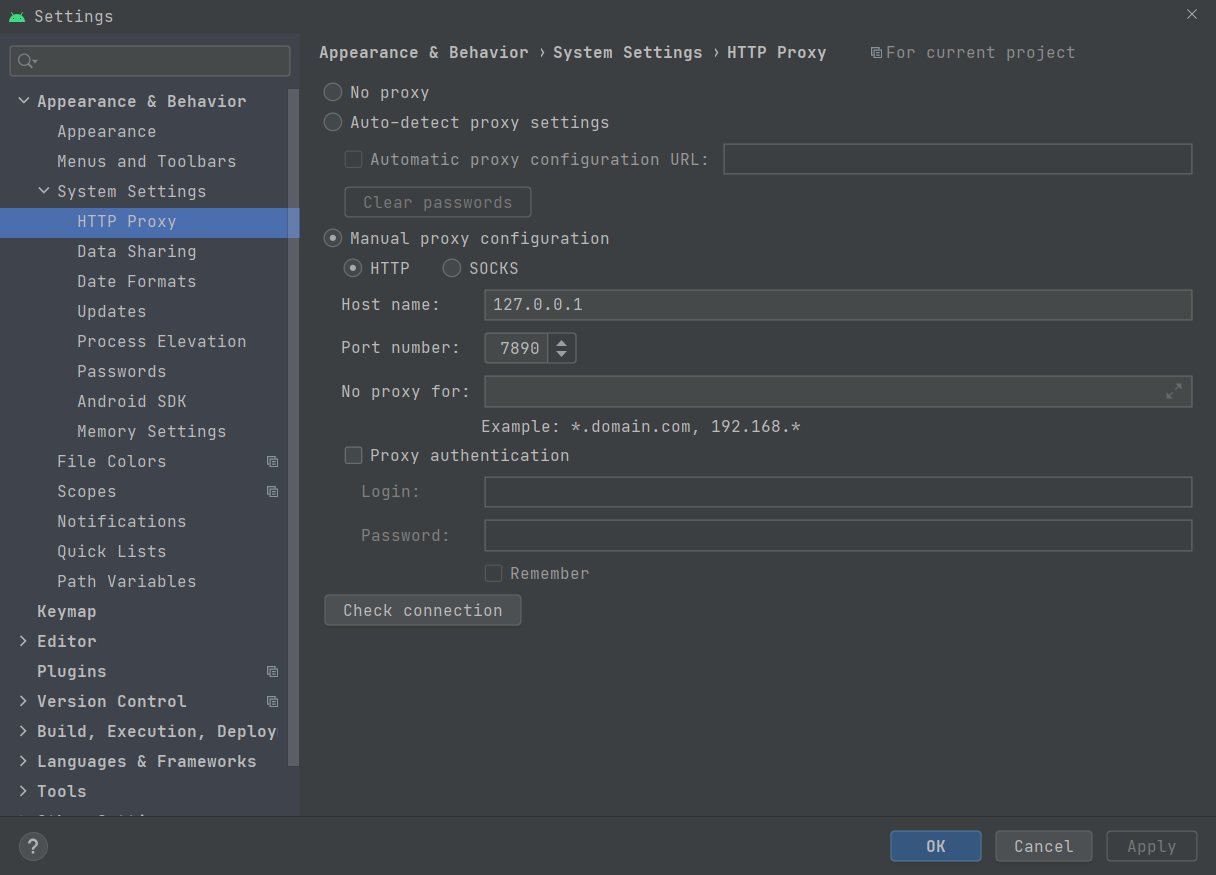
0x02 AndroidStudio代理设置

Android Studio 的代理设置

Perference --> Appearance & Behavior --> System Settings --> Http Proxy

20230517195623

0x03 Gradle代理设置

gradle代理可以配置在:

  1. 环境变量GRADLE_USER_HOME指定的gradle系统目录默认路径\Users\Xxx\.gradle\gradle.properties
  2. 项目根目录gradle.properties

前者优先级更高。

1
2
3
4
5
6
systemProp.http.proxyHost=127.0.0.1
systemProp.http.proxyPort=1080
systemProp.https.proxyHost=127.0.0.1
systemProp.https.proxyPort=1080
systemProp.socks.proxyHost=127.0.0.1
systemProp.socks.proxyPort=1080

0x04 配置代理用户名和密码

1
2
3
4
5
6
7
8
9
10
11
12
13
14
# Project-wide Gradle settings.
...
systemProp.http.proxyHost=proxy.company.com
systemProp.http.proxyPort=443
systemProp.http.proxyUser=username
systemProp.http.proxyPassword=password
systemProp.http.auth.ntlm.domain=domain

systemProp.https.proxyHost=proxy.company.com
systemProp.https.proxyPort=443
systemProp.https.proxyUser=username
systemProp.https.proxyPassword=password
systemProp.https.auth.ntlm.domain=domain
...

0x05 过滤代理

对于国内的仓库可以不走代理,还有部分内网地址也可以不走代理

1
2
3
systemProp.http.nonProxyHosts=developer.huawei.com|maven.aliyun.com|192.168.*
systemProp.https.nonProxyHosts=developer.huawei.com|maven.aliyun.com|192.168.*
systemProp.socks.nonProxyHosts=developer.huawei.com|maven.aliyun.com|192.168.*

0x06 修改gradle.properties配置

1
org.gradle.jvmargs=-DsocksProxyHost=127.0.0.1 -DsocksProxyPort=10808

Android专栏-BaseQuickAdapterHelper

Android专栏-BaseQuickAdapterHelper

0x01 自动加载更多-LoadingFooterView

1
2
3
4
5
6
7
8
9
10
11
12
13
14
15
16
17
18
19
20
21
22
23
24
25
26
27
28
29
30
31
32
33
34
35
36
37
38
39
40
41
42
43
44
45
46
47
48
49
import android.view.View
import android.view.ViewGroup
import com.chad.library.adapter.base.loadmore.BaseLoadMoreView
import com.chad.library.adapter.base.loadmore.LoadMoreStatus
import com.chad.library.adapter.base.util.getItemView
import com.chad.library.adapter.base.viewholder.BaseViewHolder

class LoadingFooterView : BaseLoadMoreView() {
private var loadingView: LoadingPagView? = null
override fun getRootView(parent: ViewGroup): View {
val rootView = parent.getItemView(R.layout.ui_footer_adapter_load_more)
loadingView = rootView.findViewById(R.id.loadingView)
return rootView
}

override fun getLoadingView(holder: BaseViewHolder): View {
return holder.getView(R.id.loadingView)
}

override fun getLoadComplete(holder: BaseViewHolder): View {
return holder.getView(R.id.fakeView)
}

override fun getLoadEndView(holder: BaseViewHolder): View {
return holder.getView(R.id.endView)
}

override fun getLoadFailView(holder: BaseViewHolder): View {
return holder.getView(R.id.fakeView)
}

override fun convert(holder: BaseViewHolder, position: Int, loadMoreStatus: LoadMoreStatus) {
super.convert(holder, position, loadMoreStatus)
when (loadMoreStatus) {
LoadMoreStatus.Complete -> {
loadingView?.stopPlay()
}
LoadMoreStatus.Loading -> {
loadingView?.startPlay()
}
LoadMoreStatus.Fail -> {

}
LoadMoreStatus.End -> {
loadingView?.stopPlay()
}
}
}
}
Your browser is out-of-date!

Update your browser to view this website correctly.&npsb;Update my browser now

×